





























:format(jpeg) "Retrofitting smart lighting control")
Retrofitting smart lighting control
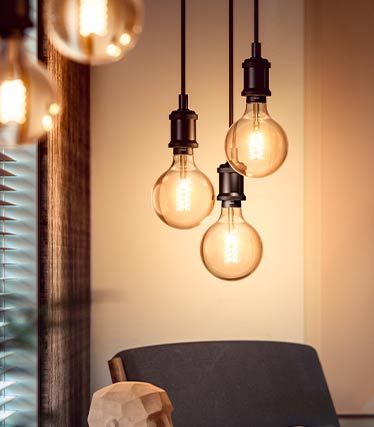
Experience light in a new dimension with Smart Home! Getting started has never been so easy - thanks to smart bulbs that can be inserted into the socket of any conventional light and can be controlled immediately via Bluetooth or WLAN. With just one tap on the smartphone, the light can be dimmed and - depending on the product - individually changed in the RGB colour space. The full range of functions can be accessed with a wireless bridge, e.g. the Philips Hue bridge: control the lighting from anywhere, programme lighting routines, control light by voice and allow networked devices to interact with each other - all this is possible!
Start smart home lighting control - with and without conversion!
Two ways to smart lighting control)
The easiest way to get started with smart lighting control: Unscrew your old traditional light bulbs and put in smart bulbs! The smart home bulbs from LUUMR, which are available for all standard sockets such as E27, E14, GU10 or G9, are controlled using the Tuya app. They are compatible with other smart lighting systems such as Philips Hue and can therefore be easily integrated at a later date. Until then: simply install the Tuya app, connect the lamp and control the light individually. Ideal for tenants, beginners and anyone who wants to get started straight away.
)
You want the full range of functions? Then opt for smart lights with built-in smart home technology and the use of a wireless bridge! Depending on the system, they connect directly to the home WLAN and are ready for a new level of personalised light. Brightness and colour temperature can be individually adjusted via app or voice assistant. In addition, timer schedules and motion sensors enable automatic control, which makes everyday life easier. If you wish, you can add more devices to your smart home system at a later date.
Quick start tip: If you want to get started straight away, start with smart bulbs or the use of an adapter plug. With the latter, non-smart devices can be integrated into the smart home system, whereby the functionality is of course limited by the lamp or light (often the light can only be switched on or off via the app, but even that is already a step towards convenient lighting control). Smart home lighting control doesn't have to be expensive or complicated. In addition, the installation of modern smart home systems is relatively simple: no walls need to be torn open for any cabling, as was the case a few years ago. Today, smart homes are possible for everyone and at any time - including tenants.
With or without radio bridge:
Lighting control options with Philips HuePhilips Hue is the best-known smart home system in terms of lighting control. With 16 million colours and a wide range of white tones from daylight to warm white, we can create the ideal ambience for any situation with a Philips Hue lamp or light.
Philips Hue already works with Bluetooth, but when a bridge is added, the system shows what it's really made of: remote control from anywhere in the world, light routines, voice control and home security - Philips Hue fits into everyday life in a meaningful way.
Start without bridge
)
A bulb with Bluetooth control is all you need to get a taste for it.
Functional diversity with Bridge
)
If you connect a bridge to the WLAN, you can enjoy the whole smart home world.
Top recommendations for smart home beginners
 "Ceiling lamp from Aurelle")
 "Go from Philips Hue")
 "LED strip from LED strip plus")
 "White colour amiance from Philips Hue")
 "White colour econic from Philips Hue")
 "Globe filament from Giant")
If you want to install new, smart lights: Work on the 230V electrical installation may only be carried out by a specialist!
Installation & tips for smart home lighting control
First steps: Set up, pairing & app setupDownload the right lighting control app for your system. With the lighting control app, you can later link bulbs, create groups and create routines.
Activate the coupling on the bulb, the light or the bridge. Follow the instructions in the app - a quick press of a button or switching on the bulb is usually all it takes and the smart lighting control system is ready for use.
Connect the Smart Home lighting control system to Alexa, Google Home or Apple HomeKit (depending on the smart home system). Now you can control your light simply by voice: "Alexa, switch on the light in the living room!" - a convenient and modern solution that makes the smart home really smart.
Troubleshooting: If it doesn't work straight away
Even the best smart home lighting control system sometimes needs fine-tuning. Here are a few quick solutions:
With Bluetooth Mesh systems, it helps to use additional light sources as repeaters. A more powerful router or repeater can help with WLAN systems.
If devices cannot be paired, a short reset usually helps. Then re-pair - the light control with app is stable again.
Not every smart bulb has the same range of functions. It is best to use suitable components from your system (e.g. Philips Hue) and make sure that the light source has exactly the range of functions you want (e.g. RGBW colour control) when purchasing from the wide range of products available.
Advantages of smart lighting control
:format(jpeg) "Situation-dependent light")
A smart light source adapts its brightness and light colour to the situation - without an external dimmer. This means we can use the same light source for different activities such as working or relaxing.
)
Burglars look for easy targets where they can recognise that nobody is at home. Smart lighting makes it possible to programme lighting routines - it looks as if someone is at home.
)
A tap of the finger is all it takes for grouped lights to create a special ambience - for relaxing, working, doing housework or daydreaming. These light scenes can be saved for later.
:format(jpeg) "Voice control")
It's every smart home owner's dream: controlling light by voice. Today, this dream is easier than ever to realise. Compatibility with the respective voice assistants is indicated for all products.
:format(jpeg) "Save energy")
Smart lighting control enables precise control of the lighting. This enables more energy-efficient utilisation. By the way: All smart light sources work with modern LED lighting technology.
:format(jpeg) "High compatibility")
Smart lighting systems can often also interact with each other across manufacturers and be combined to create a comprehensive smart home experience, e.g. with heating control, blinds, sensors, cameras or door locks.
Which brand suits you?
It's best to stick with one system, as not all smart home products are compatible with each other. Here you will find the most popular brands for smart home lighting control:
:format(jpeg) "Philips Hue")
The classic smart lighting control system. Highly functional, extensive range, perfect for the highest demands.
:format(jpeg) "LUUMR")
Smart technology that can be seamlessly integrated into everyday life. Compatible with all Tuya-based smart home devices.
:format(jpeg) "LEDVANCE smart plus")
Intelligent smart home solutions for indoor and outdoor use with a wide range of functions.
:format(jpeg) "WiZ")
WiZ lamps have an integrated WLAN chip. This means that a central hub or gateway is not required.
:format(jpeg) "Tint")
Can be integrated into an existing ZigBee-enabled smart home system with just a few clicks.
:format(jpeg) "Lindby")
:format(jpeg) "Paulmann")
A leading brand manufacturer in the lighting industry with over 2,500 lighting products and systems, many of which are smart controllable.
:format(jpeg) "ZigBee")
ZigBee is a wireless protocol for smart home automation. ZigBee products can be integrated into ZigBee-based smart home systems and then controlled with a central app.
 "Smart outdoor lighting")
 "Indirect lighting")
 "Cosy lighting")
 "What is ZigBee")
 "Gaming lighting")
 "Human Centric Lighting")